by Scott McLeod | Apr 9, 2009 | Miscellaneous, Our Changing World, Tech Tools |
TIME has a new article out on the use of Web 2.0 tools by the United States Central Intelligence Agency (CIA). Apparently Intellipedia, a classified version of Wikipedia, has been “transforming the way U.S. spy agencies handle top-secret information by fostering collaboration across Washington and around the world.”
Here’s what I think is the money quote from the article:
The first time chlorine was used in an improvised explosive device in Iraq, someone created a wiki page asking what intelligence officers and others in the field should do to collect evidence of the usage. "Twenty-three people at 18 or 19 locations around the world chimed in on this thing, and we got a perfectly serviceable set of instructions in two days," says Tom Fingar, who headed the National Intelligence Council from 2005 to 2008. "Nobody called a meeting, there was no elaborate 'Gotta go back and check with Mom to see if this is the view of my organization.' "
Intellipedia now consists of 900,000 pages, has about 100,000 users, and receives around 5,000 page edits a day. Hey, if the deeply paranoid folks at the CIA can do this Web 2.0 stuff, can’t schools?
![PostRank confuses me]()
by Scott McLeod | Apr 8, 2009 | Blogging, Miscellaneous, Tech Tools |
Larry Ferlazzo blogged yesterday about PostRank’s list of the top education blogs as measured by “engagement.” I think PostRank has the potential to be a really useful tool but right now I have some serious questions about it. For example… [click on images for larger versions]
1. Why is edu.blogs.com on the list twice?

2. I don’t think www.ed.gov technically is a “blog.” And I don’t think its affiliated static web sites like Do[ing] What Works or African-American History [FREE] are either.

3. I confess that when I think of “education blogs,” neither EurekAlert! nor Common Craft nor OUPblog nor Clear Admit pop into my head. Ever.


4. Yesterday this blog was #78 – down from #30 the previous week – below Teacher Lingo. That was cool except my engagement numbers seemed significantly higher. So I figured maybe I didn’t understand the ranking system. But then this morning I find that this blog is #35 – down from #31 last week. Huh? What happened to me being #78 and #30? Now I don’t have any faith in its engagement numbers or its rankings.


PostRank clearly isn’t ready for prime time yet (but keep an eye on it!)…
by Scott McLeod | Apr 7, 2009 | CASTLE, Higher Education, News and Events, Tech Tools |
Recently I was interviewed for The Chronicle of Higher Education’s article on academics who Twitter. Here’s my portion of the story:
8. Scott McLeod, an associate professor at Iowa State University and director of the university's Center for the Advanced Study of Technology Leadership in Education. Tweet: "College students are online more AND reading more? http://snipurl.com/eko4k"
http://twitter.com/mcleod
Followers: 1,307. Posts: 1,190.
Mr. McLeod argues that professors have been too slow to adopt Twitter. Academic discussions online often take place on closed e-mail lists, he says, when they should be happening in public forums like Twitter, so that a diverse group of outsiders can join in. "I think academics are actually missing a lot by not being involved in more of these social tools," he told me. "There are a lot of academics who think, 'If it's not coming from some other academic it's not worth a damn,' and that's not right."
He admits that some of the messages on Twitter are banal, such as people describing what they had for lunch that day, but he said such notes are part of what makes Twitter such a powerful way to feel connected to far-flung colleagues. "It's like those daily interactions you have with your neighbor — sometimes they're highbrow and sometimes they're lowbrow, but after a while you really get to know the person."
I don’t know if academics have been too slow to adopt Twitter specifically, but I definitely believe that academics have been too slow to adopt social media generally.
Check out the article if you’re interested. What do you think are some good ways that professors could be using Twitter?
![PostRank confuses me]()
by Scott McLeod | Apr 2, 2009 | Planning and Funding, Tech Integration, Tech Tools |
 I greatly enjoyed Clive Thompson’s recent Wired article on netbooks. For years laptop manufacturers have been giving us more and more powerful computers: bigger hard drives, more memory, faster processing chips, etc. What netbooks have shown, however, is that many laptop users actually need less, not more. When 95% of laptop use is for things like e-mail, instant messaging, basic office productivity software, Facebook, YouTube, and so on, people don’t need a super workhorse computer. Instead, a less-capable computer works just fine and other concerns such as portability (size and weight) and cost become more important.
I recently purchased my second netbook, a HP Mini, to go along with my Dell Mini 9. I have used these netbooks for a full day of presenting – which usually includes showing very large PowerPoint presentations with embedded videos, Web surfing, and using Microsoft Office – without a hiccup. I tote along in a small bag my 2.4 pound netbook, wireless broadband dongle, portable external hard drive, and presentation remote and I’m all set. Throw in my cell phone, iPod or iPod Touch and headphones, a paperback book, and a Moleskine pad and pen and my road warrior status is downright bearable (shhh – don’t tell my wife!).
For many schools, I think netbooks can make a lot of sense. At $300 to $450 per computer, the price is low enough for many districts to start thinking about a 1:1 deployment for students for the very first time, either for entire schools or for smaller grade- or class-level pilot projects. Scatter a few more-powerful machines around the school building for students who need to do heavier-duty work (e.g., photo or video editing) and this becomes a workable solution for a number of school organizations. Of course full-fledged laptops still have their place and many schools may find that the more-traditional approach works better for their 1:1 needs.
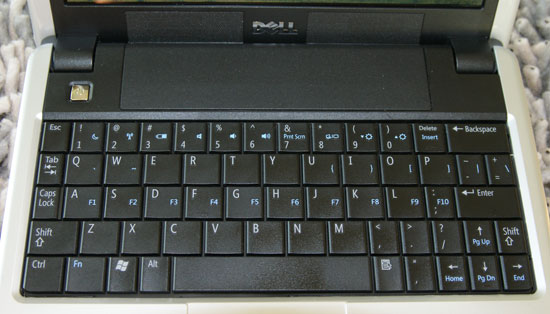
Schools that are considering purchasing netbooks should do a careful job of comparison shopping. For example, I wouldn’t recommend either of my netbooks for schools. The keyboard for the Dell Mini 9 is just too small for me and my right pinky finger is always looking for the dang apostrophe key (which Dell moved to the bottom row). In contrast, the keyboard for the HP Mini is wonderful (it’s 92% of the size of a full keyboard) but HP in its infinite wisdom decided to use a proprietary VGA port, necessitating the purchase of a separate converter cable to connect to a projector (which has resulted in a lot of angry customers). Schools may find that other models such as the Acer Inspire One, Lenovo Ideapad S10, or Asus Eee PC 1000HE are more workable solutions. Since the technical specifications of netbooks are all basically the same right now, design issues such as the keyboard layout often are the distinguishing factors. I strongly recommend a hands-on test drive of a particular netbook model before you make any kind of large-scale purchase.
I really like my HP netbook a lot. Like others, I have been quite surprised to find how useful this less-capable laptop has been to me. Because of its small size, I take it places I never would consider taking my Lenovo ThinkPad X61 Tablet and indeed am gravitating more and more to using it as my primary computer whenever I travel anywhere. What’s really exciting to me is to think about what these small laptops will look like just a year or two from now. I’m guessing that they will have much larger solid-state hard drives and include much of the capability that currently give larger laptops a performance advantage. A netbook that can do what today’s laptops do, in just a couple of years? That’s a winning combo!
Photo credit: HP Mini
![PostRank confuses me]()
by Scott McLeod | Mar 25, 2009 | 21st Century Skills, Learning and Teaching, Tech Integration, Tech Tools |
 I found out recently that my local school district now allows students to bring their own laptops from home. I think that this is GREAT (even while simultaneously understanding the digital divide issues that accompany this policy).
Imagine that your local district allows the same. Would you send your children to school with a laptop/netbook? If so, would your children take one (or would they be too worried about standing out because other students weren’t also bringing computers to school)? This latter question’s of particular interest to me since my tech-savvy daughter starts middle school next year…
Thoughts?
Photo credit: Netbook Skin using Wordle.net (Lenovo S10) [cool use of adhesive photo paper!]
by Scott McLeod | Mar 7, 2009 | 21st Century Skills, Blogging, CASTLE, Law, Policy, and Ethics, Leadership and Vision, Learning and Teaching, News and Events, Our Changing World, Planning and Funding, Pre-Service Preparation, Professional Development, Quotes, Research and Evaluation, Tech Integration, Tech Tools |
I've had a lot of fun guest blogging over at The Des Moines Register this week. For those of you who would like to have a single link that you can forward to others, you can use this web address:
![PostRank confuses me]()
by Scott McLeod | Mar 5, 2009 | Learning and Teaching, News and Events, Our Changing World, Tech Integration, Tech Tools |
 I was really excited to read David Pogue’s article today on Amazon’s new Kindle for iPhone application that allows you to download e-books from Amazon onto your iPhone or iPod Touch. That’s right – no need to buy a Kindle to access Amazon’s ever-increasing book selection. I was quoted today in the Des Moines Register as saying that in many ways the iPhone represents the future of mobile computing. Sure, there’s still a place for the larger screens and keyboards of laptops and netbooks, but it’s awfully handy to have a device in your pocket that does so much.
I’m off to the Apple app store! Wouldn’t it be really great if Amazon made its source code public so that others could improve upon its free app (and thus result in Amazon selling more books)?
At $10 a book (or maybe a little more for textbooks), I think this opens up a lot of possiblities for K-12 classrooms. What do you think?
Photo credit: And a good book
![PostRank confuses me]()
by Scott McLeod | Mar 4, 2009 | 21st Century Skills, Law, Policy, and Ethics, Leadership and Vision, Our Changing World, Slides, Tech Integration, Tech Tools |
[This is Post 3 for my guest blogging stint at The Des Moines Register.]
Archimedes said “Give me a lever long enough and I can move the world.” This week I am blogging about 5 key levers that I think are necessary to move Iowa schools forward and help our graduates survive and thrive in this new digital, global age in which we now live. Yesterday I discussed online learning opportunties for students. Today’s post concerns providing a computer for every student.
It is hard to believe that the personal computer is nearly three decades old. Our computing devices have come a long way in that time and they now permeate nearly every aspect of our personal and professional lives. At the individual level, this movement has been driven by mobile computers and phones, wireless access, and the rise of the Internet. Every generation of computers seems to be smaller, cheaper, faster, and more powerful than the one before. Every new device or online service allows us to do things more efficiently, more effectively, or that we never could do before. And of course the pace of change is quite brisk.

As a result, it’s extremely difficult to find a well-paying job in America these days that doesn’t involve significant use of digital technologies. Unlike other sectors of our society, however, our schools still view the use of computers as a marginal add-on, as something that’s optional rather than essential to the everyday core of teaching and learning. Our schools still pretend that it’s an analog paper world rather than a networked digital world.

This has got to stop. We have to stop believing that we can adequately prepare graduates for a technology-suffused world by immersing them in paper-suffused learning environments. We have to look critically at student-computer ratios in schools – which mask the reality that most computers belong to teachers or are in labs – and ask a different question instead: On average, how much time per week do students get to use digital technologies as part of their classroom learning? The answer to this question is dismally low in almost every Iowa classroom.
There are a number of reasons for the lack of technology-facilitated learning opportunities in our K-12 schools. One is funding, of course. I recently did some back-of-the-envelope calculations for Iowa’s Institute for Tomorrow’s Workforce. At $300/year, the costs each year to provide a laptop to the 480,000 students in Iowa would be:
213,000 K-5 students = $63.9 million
114,000 6–8 students = $34.2 million
153,000 9–12 students = $45.9 million
These numbers look daunting, particularly given difficult economic times. But it is possible to do this by sharing the cost between state monies and school districts’ general funds, levies, and referenda. Other potential ways to reduce costs include, but are not limited to:
- utilizing federal or grant monies,
- leasing instead of buying,
- purchasing netbooks instead of laptops,
- allowing students to bring in their own laptops,
- making use of the mobile computers that most students bring to school every day (i.e., their cell phones), and/or
- only purchasing laptops for economically-disadvantaged students.
In the end, we have to balance the costs of doing this versus the costs of NOT doing this.
In addition to funding, numerous other challenges exist as well. One of the biggest is the current predisposition of schools to invest in teacher-centric technologies like televisions, DVD/VCR players, projectors, electronic whiteboards, and document cameras. They’re important and useful but they’re also primarily used as yet another way for teachers to push out information to students. In contrast, laptops, netbooks, digital cameras, small high-definition camcorders, digital voice recorders, webcams, digital scientific probes or sensors, and other devices are primarily used by students to facilitate their own academic learning. If we want Iowa students to gain the technology skills they will need to be productive citizens and workers, schools should be making as many investments in these latter, student-centric devices as possible. There also are a number of free or low-cost online software and tools that students and teachers can use in creative and productive ways.
Another large barrier to students’ technology usage is teachers’ inability to effectively implement digital tools into their instruction. One of the dirty secrets of K-12 educational technology is that many of the computing devices that already have been purchased are rarely used. This may occur because of teachers’ lack of training; most educators need a lot more help in this area. Or it may occur because of a lack of adequate technology support, which results in teachers inability to rely on the technology actually working when they do decide to use it. Or it may occur because of teachers’ outright refusal to integrate technology because of lack of interest or comfort.


Other barriers include the often-draconian Internet filtering systems that are in place in most schools, the increased pressure on schools’ Internet bandwidth capacity from additional computing devices, and the lack of adequate wireless and/or electrical capacity in many of Iowa’s school buildings.
The state of Maine provides laptops to 36,000 students and 11,000 educators (at a cost of just under $300/head, which is the basis of my calculations above). The New South Wales province in Australia has announced that it will be purchasing 197,000 laptops for its secondary students. A number of schools and districts across the country (and a few in Iowa) are piloting or implementing 1:1 laptop programs for students. It is these graduates, who have had the opportunity to regularly utilize in productive ways the same technologies that the adult world uses, who will be best prepared for a digital society.

Chris Lehmann, Principal of the Science Leadership Academy in Philadelphia, notes that technology in schools should be like oxygen: ubiquitous, necessary, and invisible. This is how technology is in adult workplaces. Can you imagine how unproductive you would be in your job if you had to schedule a time next Thursday for 45 minutes in order to use the computer (as teachers now have to do for students to use the lab(s) in their schools)?
There will be a day when we look back and realize how foolish it was that we waited so long to get a computing device into every student’s hands 24–7. Until that day, however - until we find the collective will to enable Iowa students to productively utilize in their schools the technologies that are transforming our society - they will continue to be disadvantaged compared to their more fortunate counterparts in other states or countries.
Recommended reading
Recommended viewing
![PostRank confuses me]()
by Scott McLeod | Feb 17, 2009 | Tech Integration, Tech Tools |
I tweeted:

Here are the responses I got. Thanks, Twitter network!


by Scott McLeod | Dec 14, 2008 | Tech Tools |

This is Minnie, our Dell Inspiron 910 Mini “netbook” that’s the newest addition to our computer family. As the pictures show, she’s a lot smaller than my ThinkPad X61 Tablet. She shipped with 1 GB of RAM and a 16 GB Flash hard drive. She’s running Windows XP Home, Microsoft Office 2007, Skype, a number of media players, and a few other programs. She’s got a built-in webcam and a bunch of ports and jacks around the edges.

Like any family member, she’s not perfect. Her small keyboard’s not the greatest. The function keys are the same keys as ASDFGHJKL; and the apostrophe’s way down in the bottom row. Her speakers are a little anemic. Occasionally she’s a little pokey, which is to be expected with a netbook.

All in all, however, my kids and I like her a lot. She weighs just over 2 pounds, measures about 9 in (23 cm) by 6.75 in (17 cm), and has at least a 3–hour battery life. She’s light, extremely portable, and boots up very quickly. I’ve remapped the keyboard slightly and also did a BIOS upgrade that added F11 and F12 functionality. I upgraded her RAM to 2 GB, which was extremely easy to do and boosted her performance a bit. She’s a sleek little machine, particularly for Internet browsing and cloud computing.
Many people are touting netbooks as possibilities for 1:1 laptop initiatives in K-12 schools. Having now used Minnie for a few weeks, I think netbooks might work pretty well in that role, particularly as their functionality improves a bit over the next year or so.
Gloria, our GPS unit, is happy to have a friend in the house…